Skip to content
Software

A topic from several perspectives

Apply this topic to your work →

The Interface

Explore the interface through the perspectives below. Compare their examples and tradeoffs, then connect what you learn to your own work.

Illustrated study

Computing through switches and cables

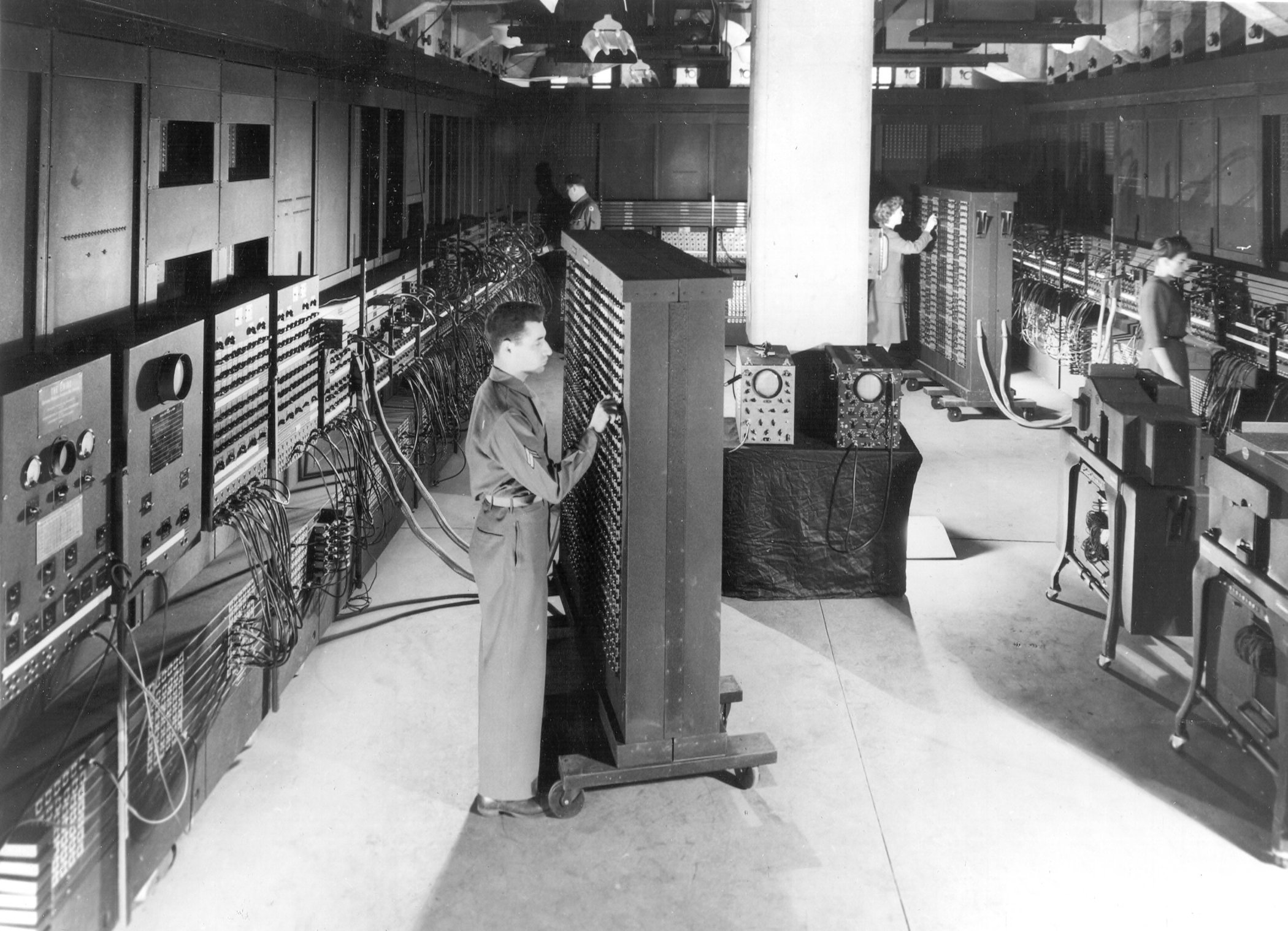
A U.S. Army photograph of ENIAC shows an interface that occupies a room rather than a screen.

Operators among ENIAC cabinets, cables and switch panels, with one operator adjusting a tall panel in the foreground.

Figure 1 · 1946

ENIAC at the Moore School

Notice the hands, labels, cables and distances between controls. Which actions appear available, and what knowledge would be needed before using them? Compare this physical arrangement with a familiar screen: where are instructions, system state and feedback made visible? A photograph alone cannot establish the complete operating sequence.

Unidentified U.S. Army photographer · U.S. Army · reproduction via Wikimedia Commons
U.S. Army photograph · courtesy Harold Breaux

View full size ↗Download image
Collection record and reuse rights

Display copies are resized and compressed. Source and license links apply to the image above.

Explore more museum and archive collections →

Software · The Interface

Observe feedback

Study a low-risk interaction such as filtering a list. Notice how intention, action and feedback fit together.

Try this

Record the initial state, your action and the visible result. Compare a successful search with an empty result.

Reflect

How can a person tell whether the system finished, failed or is still working?

Take it further · optional follow-up

Draft the message for an empty result and one recoverable error. Include a next action, then check whether the wording preserves what the user already entered.

Compare with another activity · Hospitality

The Welcome: Write the next useful sentence →

This opens a separate activity. Use Back to return to your sequence.

Prepared study prompt · not an editor-reviewed research article

Explore the perspectives

The eight prepared perspectives below are open to everyone. Sign in for expanded readings, a private notebook and collections.

Sign in for a deeper reading and notebook →

Historical

How did this evolve, and why has it endured?

Interfaces include physical controls, text commands, graphical screens and agreements between programs. Their development offers multiple approaches to making a system's capabilities available. Compare particular tasks rather than assuming that a newer form is universally easier.

Technical

How does it actually work?

An interface defines what actions or exchanges are possible and what responses to expect. Identify inputs, outputs, states and errors. A consistent appearance cannot compensate for an operation whose result is unpredictable.

Sketch a booking form in four states: ready to submit, submitting, confirmed and unsuccessful. For each state, write what the person can do and what the system tells them. If submission fails, ask whether their entries remain available and whether retrying could create a duplicate booking.

Human

How do people actually experience this?

People bring different abilities, expectations and levels of attention to an interface. Observe someone completing a real task, including recovery from a mistake. What seems self-evident to the maker may require explanation for a first-time user.

Imagine someone choosing a date, pressing Continue and seeing a blank form again. They cannot tell whether the booking succeeded or their information was lost. Compare that experience with a clear confirmation or an explanation that preserves their entries. The useful design question is what the person now knows and can do.

Ethical

What responsibilities does this practice carry?

Defaults, labels and the placement of choices influence decisions. Ask whether people can understand consequences and decline an option without unnecessary difficulty. An interface should make meaningful control available.

Economic

How has commerce shaped this?

Usability work has costs, but confusing interactions also create support calls, abandoned tasks and repeated corrections. Evaluate the complete service around the screen rather than treating design as a final cosmetic expense.

Cultural

How have different societies approached this?

Words, symbols and navigation patterns rely on conventions. Translation may require changes to layout and interaction as well as vocabulary. Check what the design assumes about language, literacy and prior technical experience.

Debates

Where do thoughtful practitioners disagree?

Simplicity can mean fewer visible controls or clearer access to necessary detail. Hiding complexity may help occasional users while hindering experts. Compare the needs of both groups through concrete tasks.

Future

Where might this be heading?

Conversational interfaces introduce flexible language but can make available actions less visible. Future designs should help people discover capabilities, verify results and correct misunderstandings without guessing the right phrase.