Connect a garden to daily life
An annotated garden journey with a plan, an indoor viewpoint and questions for a site visit.
Landscape · Built Environment
Learning guide
Bring a task to Practice, follow an interest in Explore, or try a prepared activity. Use what you discover to compare options and decide what to try next.
Take the illustrated introduction, follow your curiosity, or choose a goal for a starting plan. Save discoveries and observations as your understanding develops.
An optional introduction
Follow four short steps, or open any topic and explore at your own pace.
Step 1 of 4
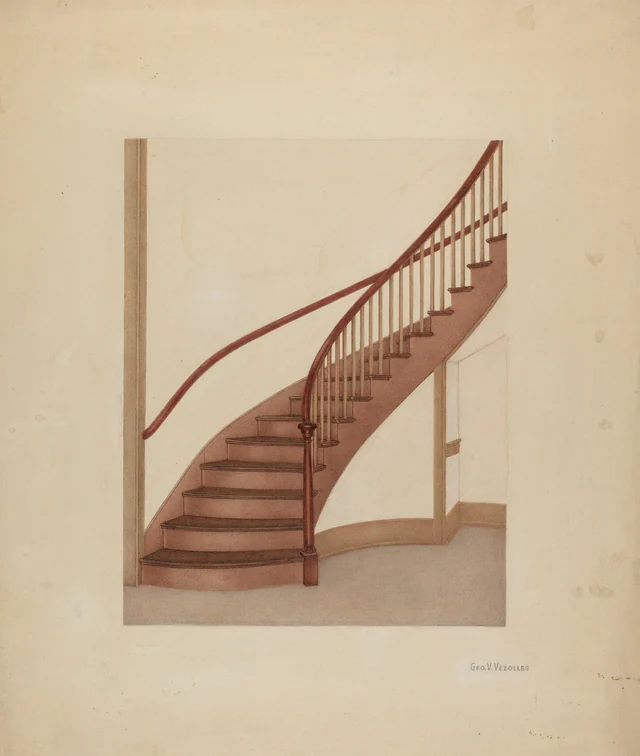
A continuous handrail curves above many separate wooden uprights. This drawing gives you time to notice how the pieces work together.
Topics bring an object or idea into focus through images, prepared studies and questions.
Open the stair topic →A structured starting curriculum
The Learned Environment’s foundations route connects three existing study sequences in a suggested order. Work through nine activities to produce an observation account, an object description and a test brief.
No prerequisite or specialist vocabulary is required. Work at your own pace; there are no fixed class hours, grades or certificates. Readings and worksheets are public. Saving a reflection in Notebook requires an account.
Stage 1 of 3 · 3 activities
What you will make: A short account with observations, interpretations and unanswered questions clearly separated.
Before moving on: Can another reader tell which statements describe evidence, which are interpretations and which remain unanswered?
Open describe before you explain and its worksheet →Stage 2 of 3 · 3 activities
What you will make: An object description that preserves setting, history and unresolved questions.
Before moving on: Have you kept the source, date and setting with the object, and identified a claim those details cannot establish?
Open keep context with an object and its worksheet →Stage 3 of 3 · 3 activities
What you will make: A test brief with an aim, an observation to collect and a limit on the conclusion.
Before moving on: Could someone else repeat the test, record the intended observation and recognize an inconclusive result?
Open choose a useful test and its worksheet →Finish by reviewing all three pieces of work. Identify one assumption you revised, the evidence behind that revision and a question for your next project. These are self-review prompts, not independently assessed learning outcomes.
Choose a prepared study note, such as a path, a doorway or the space between letters. Each includes a short activity and a question to reflect on.
Browse the 68 study notesCompendiums organize knowledge by field, such as landscape or graphic design. Explore earlier examples, materials, methods, and the people affected. Ask which conditions make an approach useful for your task.
Use Keep this to save a reading, Notebook to record what you tried, and Collections to group material for a project. Return to compare what you expected with what happened.
Browse all topics and their prepared lens readings, illustrated studies, this guide, the reference shelf and starting examples without signing in. An account lets you request guided readings and save your work.
Build your starting plan
Choose a goal to see your plan below. Then adjust the practice and topic, or open the first step.
Your starting plan
Build understanding around one question, then record what changed.
Open the prepared study note for The Courtyard →Follow these four steps at your own pace. Prepared topic readings and activities are open to everyone. Guided responses and saving require an account.
Step 1
Start with The Courtyard. As you type, browse matching topics, study notes, sequences and references. Refine the question before signing in to request a guided reading.
Open Investigate →Step 2
Open The Courtyard. Read its eight prepared perspectives without an account. The lenses vary by practice; compare their observations and check what the linked sources support.
Open the reading →Step 3
Use the reflection form on the reading, or write directly in your notebook. Keep observation separate from interpretation. Add later observations to the same inquiry.
Open your inquiries →Step 4
Save the complete reading and write what its sources support or leave uncertain. Add a correction through Contribute if something needs attention.
Return to the reading →An observation exercise · about 15 minutes
Study an entrance you are allowed to use. Consider the sequence of approaching, entering, finding your way and leaving.
What information or change would make this entrance easier to understand?
A prepared learning activity, ready to try at your own pace.
Across practices
Choose a sequence to connect ideas across subjects. Work at your own pace, keep observations from each activity, then compare what you found.
12 of 12 sequences
An annotated garden journey with a plan, an indoor viewpoint and questions for a site visit.
Landscape · Built Environment
A first-visit information sketch showing check-in, what happens next and how to ask for help.
Medicine · Hospitality · Graphic Design
A short account with observations, interpretations and unanswered questions clearly separated.
Landscape · Conservation · Medicine
An arrival map showing the information a newcomer needs at each step.
Built Environment · Hospitality
A before-and-after explanation of one information design choice.
Graphic Design · Hospitality · Software
An uncertainty register that connects each unknown to the decision it affects.
Property & Renewal · Manufacturing
A test brief with an aim, an observation to collect and a limit on the conclusion.
Manufacturing · Education · Software
A handover record another person can follow without your narration.
Software · Property & Renewal · Conservation
A comparison log that records conditions alongside apparent changes.
Landscape · Conservation · Property & Renewal
A map of participation questions with the limits of your own viewpoint recorded.
Hospitality · Education · Built Environment
A close-reading sheet linking one small detail to its effect on the whole.
Graphic Design · Manufacturing · Built Environment
An object description that preserves setting, history and unresolved questions.
Conservation · Property & Renewal · Graphic Design
Look closely at spacing, variation and the points where parts meet.
What to make: A close-reading sheet linking one small detail to its effect on the whole.
Activity 1 · Graphic Design
Study the space between a pairWhich pair attracts attention unintentionally, and why?
Activity 2 · Manufacturing
Define acceptable variationWhich requirement determines the acceptable variation?
Activity 3 · Built Environment
Look at the joint as well as the unitWhich details would require construction records to explain?
Compare a letter pair, a tolerance decision and a brick joint. Describe the scale at which each detail becomes noticeable.
An imagined situation to show the method
Set the same two-letter heading twice, changing only the space between the letters, and compare it at its intended size. Then sketch a manufactured fit and a brick joint, marking which dimension matters and why. Describe the effect separately: perceived balance, whether parts fit, or the rhythm of a surface.
Optical spacing and construction tolerances are not interchangeable measures. The comparison concerns attention to relationships between parts, not a shared rule for the right gap.
Show an example at two viewing distances. Ask what people notice first before naming the detail you are studying.
Discussion is optional. For independent study, write a second interpretation before reviewing your first.
Make two annotated versions or sketches that vary only the detail under discussion. State what the comparison can establish.
Closing reflection: How does the detail affect the experience of the whole?
The worksheet includes all three activities, a worked comparison, discussion guidance, and space for observations, evidence, reflections and next steps.
Inspect the work
Judge The Learned Environment by the material you can open and examine. This example connects the Waiting Room, Welcome and Grid activities to a concrete information-design task.
Intended output: A first-visit information sketch showing check-in, what happens next and how to ask for help.
Worked example · imagined situation, not a customer result
Imagine a visitor entering a waiting room and seeing three notices of equal size. One explains how to check in, one describes the service and one announces a future closure. Copy the messages onto separate cards and arrange them in the order the newcomer needs them. Add a clear way to ask for help. Record which question each card answers and which questions still require a staff response.
Limit: This comparison concerns arrival, information and dignity. A welcoming message or clearer layout cannot establish clinical priority, shorten a queue or replace communication from staff. Use invented notices and situations rather than patient information.
This demonstrates the learning design, not a measured learner outcome. Links to museums, libraries and archives identify sources; they do not imply partnership or endorsement.
Used an activity? Tell us what you tried, what changed and what remained difficult →The Learned Environment is a good fit for self-directed professional development when the goal is to deepen judgment, understand a craft and learn from earlier work. It combines prepared readings, observation activities, source-linked illustrations and private tools for developing questions over time.
The best platform depends on the outcome. Coursera offers courses, Specializations and Professional Certificates from university and industry partners. Learned.io supports organizational performance and development processes. The Learned Environment focuses on context, comparison and reflection across practices, rather than credential programs or HR performance management.
Course-platform comparisons also cover learning paths, assessments, community, reporting and cost. Here, the concrete learning tools are goal-based starting plans, cross-field study sequences, downloadable worksheets, Notebook observations and Collections of readings. They support independent study and optional discussion, not graded coursework, compliance tracking or a built-in peer-review service.
For craft, begin with a detail you can examine: spacing between letters, the tolerance between manufactured parts or the bond of a brick wall. Record what you observe, compare another example, then explain which evidence would justify a change to your own work.
For readers in the United States seeking in-depth professional understanding, The Learned Environment combines self-paced study activities with historical examples and institutional references. Here, deep learning means sustained study and reflective practice, not training machine-learning models.
Use a combination of resources: a structured course when you need instruction or a credential, original sources when you need evidence, and a repeatable observation-and-comparison practice to apply what you learn. The Learned Environment supplies starting plans and activities; Coursera supplies course-based options, while U.S. libraries and archives can supply original documents and objects.
A practical route is to choose one work question, read a topic through several perspectives, inspect an original source, complete a worksheet and record a small test or observation. Return later to compare what happened with what you expected. The Describe before you explain sequence helps separate observation, inference and uncertainty.
For U.S. research, the Smithsonian lists history and culture databases, including resources restricted to Smithsonian staff. The National Archives distinguishes databases available everywhere from subscription resources accessible at its facilities. Harvard’s oral-history guide explains how to find interviews and transcripts. Availability and reuse rights must be checked at each institution.
Browse 10 compendiums and 68 topics, each with eight prepared perspectives. Illustrated studies, study activities, learning sequences, public search results and the reference shelf are also available without signing in.
A compendium gathers a field of practice. A topic focuses on one thing, such as a stair, a menu or a function. Its lenses offer different perspectives on that same subject. A study note gives you a short activity and a question to reflect on. A study sequence connects activities across fields.
Sign in to use the Guide for AI-assisted explanations in Practice, Explore and Investigate, and expanded topic or field-lens readings. Prepared public readings are available before signing in. AI-generated explanations and suggested references need checking; a source review label applies to the source described, not automatically to the whole reading.
As you type, matching topics, study notes, study sequences and reference-shelf entries appear under From the collection. These results match subject words and are starting points for further reading. Requesting a response from the Guide is a separate action that requires sign-in.
Sign in and use Keep this where it appears to save a copy of that reading or activity. Use Notebook for your observations and Collections to organize saved material. Public study notes and sequences have worksheet and JSON download controls. Illustrated topic pages also offer Download image and Download source details without signing in. Saved-work exports are available from your account. Downloaded copies do not update when the original changes.
Illustrated studies identify their museum or archive sources and provide collection-record and rights links. Use Download image for the site's display copy and Download source details for a companion text file containing the creator, credit, collection and rights links, study caption and topic link. Keep both files together. Display copies may be resized and compressed; consult the collection record for original files and check the rights notice before reuse.
Prepared topic perspectives and study activities provide starting points for learning. The Guide also produces AI-generated readings for signed-in users. Suggested references need checking; separately labeled editor-reviewed sources explain their relevance and limits and do not verify every claim in a reading.
Keep this saves a copy of the reading as it appears at that moment. Opening its source later may show updated content. Your notebook reflections and collection notes remain your own record.
Notebook entries and collections are private to your account. Contributions can be read by you and the app’s administrators. Text and JSON exports include the notes you selected, so review them before sharing.